Can you install a smart switch on aluminum wiring?
Yes, but never with the aluminum touching the switch. No smart switch instruction read for this page allows aluminum on its terminals or leads, and none carries the CO/ALR mark. The working route is the one the CPSC recommends for every aluminum connection: a COPALUM or AlumiConn splice to copper, after which the switch only ever sees copper.
Two answers circulate, and both stop one step short#
The first answer says you need a CO/ALR switch. It comes from the industry's own guidance: Leviton's support page, describing switches stamped CO/ALR, says "THESE ARE THE ONLY SWITCHES THAT MAY BE USED WITH ALUMINUM WIRING." The second says any smart switch is fine as long as you join the wires with connectors rated for aluminum, which is close to what Sinopé's support page says.
Neither survives the documents. None of the smart switch instructions read here claims the CO/ALR mark. The connector answer is half right: a splice to copper is what makes a smart switch possible, but the CPSC tested the common way of doing it, twist-on connectors, and found "substantial numbers of these connectors overheated severely."
What settles it is CPSC Publication 516, Repairing Aluminum Wiring (2011). Its repair turns every aluminum termination into a copper one, and the repaired system "permits the use of standard wiring devices, including receptacles and switches." A smart switch on a repaired circuit is a switch on copper.
Why aluminum connections are the problem#
A national survey run for the CPSC by the Franklin Research Institute found that homes built before 1972 and wired with aluminum "are 55 times more likely to have one or more wire connections at outlets reach 'Fire Hazard Conditions'" than homes wired with copper. Its explanation is that "several deterioration processes in aluminum wire connections" raise resistance, the damage is "cumulative in effect", and the result is overheating at the connection, not along the wire.
Replacing a toggle with a smart switch disturbs exactly those connections, so the job is a repair of the connections in that box, not just a device swap.
The CPSC dates the era: homes built before 1965 are "unlikely" to have aluminum branch circuits, and cable installed "between 1965 and the mid 1970s" in new homes, additions and rewired circuits may contain it. Aluminum circuits were sized one gauge larger than copper, No. 12 for 15 A and No. 10 for 20 A, which matters for box fill below.
What each maker's instructions say#
As written in each maker's own document, read in October 2026. "Not stated" means the document read gives no conductor wording, not that aluminum is allowed.
| Maker and model | Conductor wording in the document | How the switch connects |
|---|---|---|
| Leviton Decora Smart Wi-Fi Switch, 2nd gen (D215S) | "Do not use your switch with metal wall plates or aluminum wire." Also "Use this switch with copper or copper clad wire only." | Wire leads, joined with the included wire connectors |
| Leviton Decora Smart Wi-Fi ELV/LED dimmer (D2ELV) | "Not for use with aluminum wire." Also "copper or copper-clad wire only." | Wire leads and wire connectors |
| Leviton Decora Smart No-Neutral Dimmer (DN6HD) | "Do NOT use your dimmer with metal wallplates, electronic low-voltage, motor loads, or aluminum wire." Also "copper or copper-clad wire only." | Wire leads and wire connectors |
| Leviton Decora Smart Wi-Fi Switch, 1st gen (DW15S) | "Use this switch with copper or copper clad wire only." | Side screw terminals and back wire openings, each accepting "#14-12 AWG solid copper wire only" |
| Inovelli Blue Series dimmer (VZM31-SN) | "Connect only copper or copper-clad wire to the switch or module." | Screw terminals, 7.08 lbf-in |
| Lutron Caseta dimmer (PD-6WCL) | Not stated in the quick install guide | Wire leads, joined with wire connectors |
| TP-Link Kasa switch (KS205) | Not stated | Wire leads: "Use the labels and wire nuts to connect the wires" |
| TP-Link Kasa dimmer (KS225) | Not stated | Terminal screws: "Tighten terminal screws to 13 lbf-in." |
| Sinopé switches and dimmers (SW2500ZB, DM2500ZB, DM2550ZB, SW2500RF, DM2500RF) | "Yes, but certain precautions must be taken": "you must use CO/ALR approved solderless connectors" | Not stated on the support page |
What the table settles:
- No document here permits aluminum on the switch itself. Leviton forbids it outright on three current models and limits all four to copper or copper-clad. Inovelli says copper or copper-clad only. Sinopé is the only maker that answers "yes", and only through connectors.
- Not every smart switch has leads. The idea that smart switches all use wire leads, so screw-terminal ratings never apply, is wrong for Leviton's first-generation DW15S, Inovelli's Blue Series and Kasa's KS225. Those take the wire under a screw, where an aluminum conductor would need a CO/ALR rating that none of them claims.
- Silence is not permission. Lutron's Caseta and TP-Link's Kasa guides name no conductor at all. Lutron's own instruction for a standard 15 A single-pole switch (P/N 030-704) is the one with the often quoted line "Connect only No. 12 or 14 gauge copper or copper clad wire to switch" and, as its second note, "Do not connect aluminum wire to this device." That sheet is for a mechanical switch with screw terminals and backwire holes, not a Caseta, but it shows how Lutron words the rule where it does state it.
Why CO/ALR does not answer the question#
CO/ALR is stamped on the strap of a switch or receptacle, a term that, in Leviton's words, "means the device is suitable for use with aluminum wiring." A smart switch with leads has no terminal for aluminum to go under: the connection is a splice in the box, a connector question, not a device question.
Even where it applies, the CPSC does not accept it as a repair. CO/ALR devices "perform better with aluminum wire than non-CO/ALR devices when installed carefully," but "have failed in laboratory tests when connected to aluminum wire typical of that installed in existing homes," with test conditions that "simulated actual use conditions". Its verdict: "CO/ALR devices must be considered, at best, an incomplete repair." The CPSC files CO/ALR devices and AL/CU twist-on pigtails together as an "emergency, temporary repair."
That is the problem with Sinopé's wording. CO/ALR is a device rating; the CPSC's term for aluminum-rated connectors is AL/CU, and AlumiConn's sheet labels its lug "Aluminum to Copper (AL-CU)". If "CO/ALR approved solderless connectors" is read as any aluminum-rated twist-on connector, the result is a repair the CPSC calls temporary. Sinopé itself recommends a certified electrician.
The repair that works: splice to copper first#
The CPSC "approves of only three methods for a permanent repair": replacing the aluminum with copper, the COPALUM method, and the AlumiConn connector as the acceptable alternative.
- COPALUM is a crimped sleeve from TE Connectivity, installed "only with a dedicated power tool and crimping die" at "upwards of 10,000 pounds of force." Only electricians trained by the manufacturer are authorized to install it. The CPSC calls it "thoroughly proven by more than a quarter of a century of field experience."
- AlumiConn is a setscrew lug from King Innovation, which the CPSC says "may be considered the next best alternative for a permanent repair" where COPALUM is not available. It "has performed well in initial tests, but is too new to have developed a significant long-term safe performance history." The CPSC still wants a qualified electrician to install it.
The CPSC also names what does not count: "No other crimp connectors have been evaluated for connecting copper and aluminum conductors," and it "strongly recommends against their use." Pigtailing with twist-on connectors "does not solve the problem of overheating," and some such repairs "may be prone to even more failures than the original aluminum wire connections."
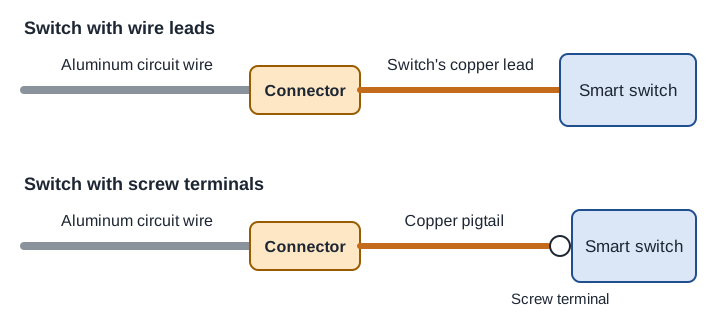
What the splice means for a smart switch#
AlumiConn's sheet sets the limits. Its 3-port lug takes "#12 - #10 Solid Aluminum" and "#18 - #10 Solid and Stranded Copper," one conductor only per port, stripped 5/16 in, with set screws at 10 in-lb on No. 12 solid aluminum and 15 in-lb on No. 10 aluminum and on all copper. It is listed to UL 486C as a pressure screw type wire connector, rated 300 V and 105°C, and is not to be reused.
Three things follow for a smart switch box:
- Count the conductors at each splice. A smart switch adds its neutral lead to the bundle of aluminum neutrals that used to sit capped at the back of the box. The CPSC wants "every connection of aluminum-to-aluminum or aluminum-to-copper wire" repaired, so that bundle needs a connector with a port for every wire, the switch's lead included. A smart switch's need for a neutral is the subject of smart switches and the neutral wire.
- A lead switch saves a pigtail. The copper range covers stranded wire, so a factory lead within #18 to #10 can go straight into a port. A screw-terminal switch needs its own copper pigtail from each splice.
- The box fills faster. Aluminum branch circuits are No. 12 for 15 A, so a two-cable switch box is counted at the 12 AWG figure, 15.75 cubic inches without internal clamps, from the worked table in will a smart switch fit your box. AlumiConn's sheet draws the lug at 1.22 by 0.77 by 0.65 in, and one per splice then competes with a deep smart switch body for the same space. Measure the box depth before choosing the switch.
Choosing the switch once the box is repaired#
On a repaired circuit the usual questions return. A switch with no neutral in the box brings its own limits, set out in no-neutral smart switch minimum loads. A ceiling fan needs a fan control, not a dimmer, as smart switches for ceiling fans shows.
The radio is the bigger decision. Kasa and Leviton's Wi-Fi models carry the tradeoffs in the hidden costs of Wi-Fi smart devices. Caseta uses Lutron's own radio, covered in proprietary radios. Inovelli's Blue Series is Zigbee and needs a coordinator. Check what survives a dropped connection in what still works in an internet outage, and run the pairing through the compatibility checker.
If the electrician's quote for the box is more than the switch is worth to you, leave the wiring alone. Smart bulbs in the fixture and a battery remote on the wall need no box work at all, the route smart lighting that stays compatible compares against switches and the one renters take anyway.
Where this page stops#
- Documents read: the models in the table, from makers' sheets, manuals and support pages (Lutron's via Lowe's and Alarm Grid copies), October 2026. Other models may word it differently; the sheet for your exact model rules.
- Copper-clad aluminum is the exception the instructions allow. Leviton and Inovelli accept copper-clad wire, and CPSC defines "CU-clad" cable as copper-coated aluminum and excludes it from its repair advice. This page makes no claim about its performance.
- 15 A and 20 A branch circuits only. The CPSC repairs "do not apply to larger gauge aluminum wire circuits" for service entrances, dryers and ranges.
- The CPSC pamphlet is from June 2011, its recommendations "as of the date of this publication." The CPSC says all modifications should be performed and inspected "in accordance with local regulations." This page does not cover the Canadian Electrical Code.
Adding a smart switch to an older house is often one item on a longer list. Moving an old smart home onto standards and the pre-purchase checklist put the wiring checks in order before anything is bought.
Do I need a CO/ALR smart switch for aluminum wiring?
No, and none of the smart switches read for this page claims the mark. The CPSC calls CO/ALR devices "at best, an incomplete repair." Splice the aluminum to copper with COPALUM or AlumiConn and connect the switch to the copper.
Can I connect a smart switch's leads to aluminum with purple wire nuts?
Not as a permanent fix. The CPSC found that "substantial numbers" of twist-on connectors "overheated severely" in its testing and treats AL/CU twist-on pigtails only as an "emergency, temporary repair." Its permanent options are COPALUM crimps, AlumiConn connectors, or rewiring with copper.
Does Leviton Decora Smart work with aluminum wiring?
Not directly. The D215S says "Do not use your switch with metal wall plates or aluminum wire," the D2ELV is "Not for use with aluminum wire," and every Decora Smart sheet read limits the switch to copper or copper-clad wire. On a circuit repaired to copper, the switch connects to copper, which is what those sheets require.
Can I put an AlumiConn on a smart switch myself?
The CPSC says the AlumiConn repair "should be conducted by a qualified electrician," and only trained electricians may install COPALUM. Many US jurisdictions also require a permit or a licensed electrician for this work. Hire one, and have every aluminum connection in the box repaired, the neutral bundle included.
Primary sources
Specification and vendor documentation we checked while writing this page. Where a claim depends on firmware behaviour rather than a published spec, the page says so inline.
- U.S. Consumer Product Safety Commission, Repairing Aluminum Wiring, Publication 516 (June 2011)
- Leviton, what are CO/ALR rated switches
- Sinopé, lighting and aluminum wires
- Lutron, single-pole switch instructions P/N 030-704 Rev. C (10/01, Lowe's copy)
- Lutron, Caseta PD-6WCL quick install guide 0301729 Rev. B (Alarm Grid copy)
- Leviton, Decora Smart Wi-Fi Switch (2nd gen) D215S installation manual
- Leviton, Decora Smart Wi-Fi ELV/LED dimmer D2ELV instruction sheet
- Leviton, Decora Smart No-Neutral Dimmer DN6HD instruction sheet
- Leviton, Decora Smart Wi-Fi switch DW15S instruction sheet
- TP-Link, Kasa Smart Wi-Fi Light Switch KS205 user guide
- TP-Link, Kasa Smart Wi-Fi Dimmer Switch KS225 user guide
- Inovelli, Blue Series Dimmer Switch manual (VZM31-SN)
- King Innovation, AlumiConn 3-port aluminum to copper lug sheet (Hom Electrical copy)